The part nobody warns you about when you get into UX research is the synthesis. Not the interviews themselves, those are energizing. It's the eight hours of footage that follows.
You've done the hard part. You sat with six, eight, ten participants, asked the right questions, got them talking. You have pages of notes and a folder full of recordings. Now you're supposed to extract meaning from all of it, and you're staring at a blinking cursor wondering where to actually begin.
User interview analysis doesn't have to be the grind it usually becomes. This is a practical walkthrough of how to do it well and how video clips, specifically, can change the way your findings land with the people who need to act on them.
Why User Interview Analysis Fails (Before You Even Start)
The mistake most researchers make during analysis isn't methodological. It's logistical.
You take notes during sessions. You capture quotes. You flag timestamps. Then two days later, you're in a synthesis session trying to remember whether it was the third participant or the fifth who said the thing about the checkout flow being confusing, and your notes say "checkout frustration, see clip" but you never actually made the clip.
UX researchers commonly report spending as much time on synthesis and shareout as on fieldwork itself, with highlight reel creation alone often taking several hours per study. That's not because the analysis is intellectually hard. It's because the tools and workflows we use force us to context-switch constantly between video files, transcripts, sticky notes, and slide decks instead of letting us think.
The fix isn't working harder. It's being systematic earlier.
Step 1: Prepare Your Materials Before You Analyze Anything
Good analysis starts before you watch a single recording.
After your last interview session and before synthesis begins, do three things:
Write a session debrief for each interview. Right after each conversation, spend ten minutes writing down your impressions while they're fresh. What surprised you? What confirmed what you expected? What quote stuck with you? This isn't analysis, it's a raw impression log. But it becomes invaluable when you're trying to remember six sessions later what made one participant's experience distinctive.
Get your transcripts ready. Accurate transcripts let you search by keyword, copy exact quotes, and move through material at three times the speed of watching video.
Set up a consistent tagging structure before you start. Decide in advance what you're coding for, even loosely. "Task friction," "mental model mismatch," "unmet need," and "positive signal" are enough to get you started. Don't wait until you're mid-synthesis to invent your taxonomy, or you'll be recoding everything.
With Clipses: Upload your interview recordings and Clipses returns a searchable transcript within minutes. You don't need a separate transcription step because the transcript lives alongside the video in the same interface. When you find a quote worth clipping later, the footage is already there. Start your analysis from the transcript immediately, no file juggling required.
Step 2: On The First Pass Read, Don't Watch
For your first pass through each session, work from the transcript, not the video.
Read through it the way you'd read a long interview article, quickly, marking things that catch your attention. Don't stop to analyze yet. You're building familiarity, not conclusions. Highlight quotes that feel significant. Note sections you want to return to.
This pass usually takes 20 to 30 minutes per session. Watching the video for the same session would take as long as the session itself.
A few things worth flagging on your first read:
Direct quotes that articulate a problem or need clearly
Moments where the participant contradicted themselves (these often point to a real tension)
Any time the participant used a workaround, that's a signal worth capturing
Emotional language: frustration, surprise, relief, confusion
Resist the urge to jump to themes on this pass. You're collecting, not organizing.
With Clipses: As you read through the transcript, select any quote that stands out. Clipses marks it as a potential clip without interrupting your reading flow. You don't have to decide yet whether you'll use it, just flag it and keep moving. By the time you finish your first pass, you already have a working library of candidate moments to revisit during synthesis.
Step 3: On The Second Pass Tag and Cluster
Now you analyze.
Go back through your marked quotes and tags, and start grouping them. You're looking for patterns: quotes that point at the same underlying problem, even if the participants described it differently.
Affinity mapping is the standard approach here, and for good reason. Whether you're doing it digitally (Miro, FigJam) or on a physical wall, the act of moving quotes around and watching clusters emerge is genuinely useful. You catch things you'd miss in a spreadsheet.
A few practical notes on this stage:
Group by insight, not by topic. "Checkout" is a topic. "Users don't trust the system to remember their cart if they leave the page" is an insight. The second one tells someone what to do about it.
Note frequency, but don't let it drive everything. If five out of eight participants mentioned the same issue, that matters. But one participant who articulated something that four others danced around might be your most important data point. Frequency is evidence, not the whole story.
Keep the quotes attached to their source. Anonymized participant IDs ("P3," "P7") let you go back to the original recording if you need more context. You will need more context at some point.
With Clipses: When a cluster starts to solidify, when you can see that four participants described the same friction in different words, pull the flagged quotes from those sessions and group them into a playlist in Clipses. You're not building the highlight reel yet. You're organizing your evidence by theme, so that when it comes time to compile clips for your shareout, the work is mostly done. Think of it as tagging in your research repo, except the quotes are already attached to the video moments that prove them.
Step 4: Build Your Evidence Layer With Video Clips
Here's where most researchers stop, and where the best ones don't.
Written quotes are necessary. They're not sufficient.
Stakeholders like product managers, engineers, and executives who weren't in the research have a well-documented tendency to discount findings they only read about. "That's just one person." "Was that representative?" "I'm not sure our users would actually do that."
A video clip of a real user struggling with something specific is harder to argue with than a bullet point in a deck. It doesn't replace the written finding. It validates it.
You don't need a clip for everything, you need clips for the findings that will face the most resistance, the moments that are hard to describe in words, and the patterns you want to be undeniable.
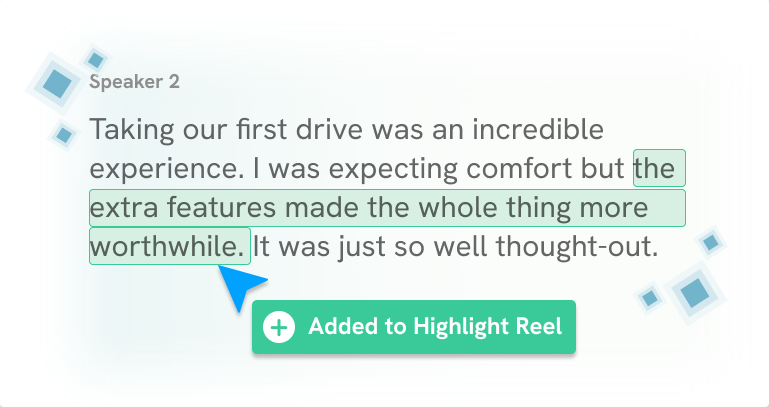
With Clipses: Select the quotes you've grouped by theme and hit "Create Highlight Reel." Clipses automatically clips and stitches the corresponding video moments into a single, shareable reel. No timeline scrubbing. No export settings. No jumping between video files. A three-minute reel showing five participants describing the same checkout problem in their own words takes a few minutes to produce, not an afternoon. The output is a shareable link you can drop directly into your deck or send to a stakeholder who missed the readout.
Step 5: Synthesize Into Insights, Not Observations
This is the hardest part of user interview analysis, and the part that separates good researchers from very good ones.
An observation is: "Participants frequently mentioned confusion during the account creation step."
An insight is: "Users don't understand why they're being asked to create an account before they can complete checkout. They read it as a trust problem, not a UX problem. They think the site is trying to capture their data, not help them."
The second one explains the first. It tells you why the behavior is happening, and it points toward what might fix it.
Getting from observations to insights requires asking "why" one more time than feels comfortable. The quote is the evidence. Your interpretation of what's underneath the quote is the insight. Both are necessary. Neither is sufficient alone.
A useful test: if your insight could apply to almost any product, it's probably still an observation. "Users want things to be easy" is not an insight. "Users in this audience have been burned by data-collection practices before and apply that skepticism to unfamiliar checkout flows" is an insight.
With Clipses: The clips you've already built become useful here, too not just for stakeholder presentations, but for your own analysis. Watching three participants describe the same problem back to back, without any of the surrounding conversation, can surface the underlying pattern faster than re-reading transcript text. The highlight reel strips away context and forces you to focus on what the participants actually said. Sometimes that's when the real insight clicks.
Step 6: Build the Shareout Around the Decision, Not the Process
The final deliverable from your user interview analysis should be structured around what your stakeholders need to decide, not around what you did.
Walk them through the research process briefly then get to the findings. For each major insight, pair the written finding with the supporting video clip. Close with clear implications: what this means for the product, what questions it raises, what you'd recommend investigating next.
Research that helps someone make a decision gets used. Research that documents what happened gets filed.
Video clips are part of how you close that gap. When a product lead watches a real user articulate a real problem, the question stops being "did this happen?" and starts being "what do we do about it?"
With Clipses: By the time you reach your shareout, your highlight reels are already built because you made them during synthesis. Send the link before the meeting so stakeholders can watch in advance. Embed the reel in your deck for the moment in the presentation when you need the finding to land. If someone on the call asks "can you show me an example of that?", you have a shareable URL ready. The research doesn't end when the readout does. Stakeholders can share the Clipses link internally, attach it to a Jira ticket, or reference it three months later when a related decision comes up again.
The Practical Checklist
If you want to pull this into a repeatable process:
Write session debriefs immediately after each interview
Upload recordings to Clipses — get transcripts ready before synthesis begins
Set your tagging taxonomy before you start coding
First pass: read transcripts in Clipses, flag notable quotes as potential clips
Second pass: tag, cluster, and build your affinity map — group flagged quotes by theme in Clipses playlists
During clustering, identify which findings need video evidence
Build highlight reels in Clipses — one per major finding, or one combined reel
Synthesize clusters into insight statements (not just observations)
Build shareout around the decision your stakeholders need to make
Share Clipses links in the deck, before the meeting, and after — keep the evidence accessible
The whole process, done well, produces research that actually changes what gets built. That's what you're optimizing for. And the difference between research that moves decisions and research that gets filed is usually the evidence layer. Clipses helps you build it.
Clipses is an AI-powered tool that creates shareable highlight reels from qualitative interview footage. It's built for UX researchers, research consultants, and research ops teams who conduct regular interview research. Start for Free.